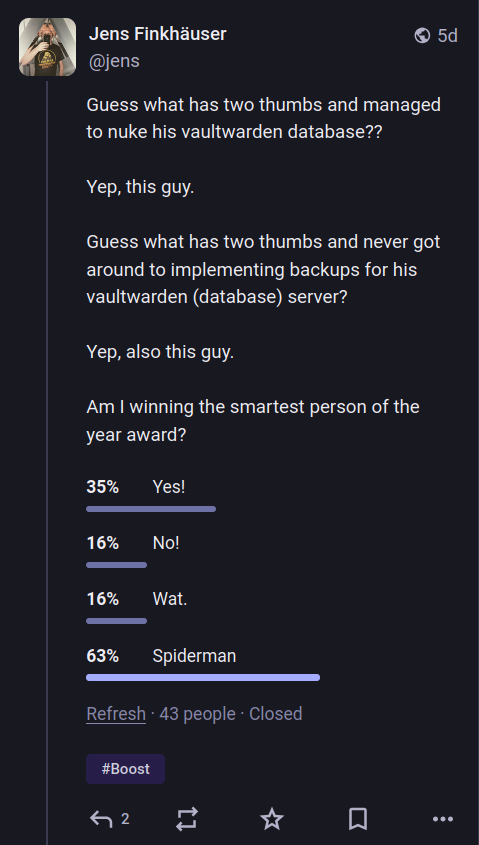
Guess what has two thumbs and managed to nuke his vaultwarden database??
Yep, this guy.
Guess what has two thumbs and never got around to implementing backups for his vaultwarden (database) server?
Yep, also this guy.
Am I winning the smartest person of the year award?
Surprisingly, the answer appears to be overwhelmingly “Spiderman”.
Anyway, a few days ago I teasered this write-up. Whether or not it needed this hype is questionable, but I was riding a wave of dopamine and serotonin, because I’d just succeeded at avoiding the loss of around 800 passwords or so.
If you’re a developer and averse to reading text, I should note up front that I produced badly structured and untested code, and you can find it here. Cthulhu have mercy on your souls if you use it, though.
Chapter 1: Prelude
It was a dark and stormy night, or a regular summer heat wave day in the 2020s, whichever sets the mood better for you. I was getting a bit annoyed with my password manager setup, which consists of a self-hosted vaultwarden server, the official Bitwarden browser plugin, and the official Bitwarden Android App. In theory, this unholy trifecta should have been protecting my darkest secrets. In practice, that was not given on this night/day.
For a while now, the browser plugin didn’t seem to be doing its job. It kept showing me a spinning summoning circle, without ever summoning the dark secrets I had entrusted it with. But the app kept working, and the web interface worked as well, so I focused on the task at hand, and ignored the damn plugin.
Until one fateful night/day, the app stopped working as well, showing much the same symptoms of possession.
Of course, I checked the web interface – that still seemed fine. So I did what anyone would do, and blamed interoperability.
It was not the first time that this haphazard conglomerate would not play well with each other. Since vaultwarden is an unofficial server, it would make sense that some API changes expected by official apps may require an update to vaultwarden.
Unperturbed, I cast “ssh” on my server to see if any updates might fix the issue.
Still unperturbed, I pulled the latest docker image. I checked the web interface, nothing.
No passwords. Now I was perturbed.
I checked the server log. It said something about “initializing the database”. This sinister incantation sent shivers down my spine. Or up. Either way, it was an unpleasant feeling.
Surely it didn’t mean it would overwrite the existing database now, would it?
Oh, but it would.
And don’t call me Shirley.
Chapter 2: Operational Failings
Not long ago, I’d purchased cold storage for sending backups to. Up until recently, a lot of my personal use machines had backups that consisted of “just make a copy of the previous server directory”, because let’s face it, most of my stuff – like this blog – has it’s content stored in a number of places anyway.
But no, now I have storage for machine backups!
Quickly, I uttered the invocations to connect to that machine, only to discover…
… well. The vaultwarden server was on the list, but ironically it wasn’t the topmost entry. Don’t want to mess up something you need every day, eh?
The occult truth that I was faced with following arcane research was that I…
… just hadn’t done it yet.
No backups of my password database. Oh no!
Chapter 3: Out of the Darkness…
Just when my despair reached its furthest depths, a glimmer of light.
What was it again that had made me choose this setup in the past? That’s right, synchronization and… end-to-end encryption.
Bitwarden promised to, yes, synchronize the database – but also that the server would never see unencrypted entriesThere’s a whole lot of metadata to see, though. Holy crap.
. So in theory that would have to mean that the app or extension would have the database present locally?
Would a malfunctioning client also clobber it? This was beyond my ken.
But hope… hope was restored, and I proceeded to Figure Shit Out.
Chapter 4: The Quest
With hope my fuel, the stars my destination!
Part 1: The Android App
Yeah, this part’s short: I don’t know if there was a decent backup there, my phone is not rooted, so I don’t get to see the storage for the app. Sucks.
Move on.
Part 2: The Browser Extension
It took me a little while, but I managed to find the storage folder where the browser extension should store my passwords. The only trouble was, there wasn’t a whole lot there.
Now I could have dug deeper into this, but I felt the sting of not having backups. So before I could investigate, I decided to try a different avenue: restore backups!
Interlude I
Wait, what? I thought the whole point of this was that there weren’t backups?
And you’re right, precious, there weren’t – on the server. But like any good geek, I run regular backups for my desktop, which also includes LibreWolf’s profile folder, and so its local storage for websites and extensions.
I replayed a backup of that folder, because I figured it’d get me access to my database faster than anything else.
The Fatal Flaw
Here’s what truly, thoroughly sucks about Bitwarden’s apps: they don’t let you unlock your locally cached database without authenticating with the server.
I mean, why?
I can concoct arguments about security, but if the E2EE scheme is decent, that’s mostly bullshit. If I have the master password, I should be able to unlock the local DB.
But it turns out, Bitwarden apps say no to that. Which means that disaster recovery is not a well-covered scenario.
This more than anything prompted me to move on, and look for a new solution.
Interlude II
So… browser profile recovered, the extension nonetheless refused to give me the goods.
Time for the nukular option.
Part 3: Browser Local Storage
Scanning the local storage directories, I quickly discovered a number of things:
- Most of them hold a SQLite database.
- That database contains an
object_datatable, which may contain data and/or afile_idsfield. - A sibling folder of the database also contains files, in an otherwise unspecified format.
Time to decode that data, right??
Part 4: Stored Objects
The data in the object_data field was, well, for all intents and purposes a BLOB. I couldn’t make heads or tails of it. Googling didn’t reveal much info.
So I figured, “use the source”, right? That’s what I know after all.
I cloned the LibreWolf repo, and started grepping for SQLite. Sure enough, there was a folder called “IndexeDB”, which seemed to contain pretty much everything to do with client side storage.
The code reveals that the objects should be “StructuredClones”, whatever that was.
A bit of digging further suggested that StructruredClones, amongst other things, represented a binary format of tags followed by tag specific values.
Okay, I’m down with that. How do I parse it?
Part 5: A Turn To The Dark Side
Because I really wanted my passwords, and I really wanted to not waste too much time on it, and in particular because I always complain about LLMs, well… I asked one.
Suffice to say that it gave me some helpful pointers, but also sent me down so many dead ends that, overall, it did more harm than good.
Nonetheless, it produced some parsing code that I just couldn’t get to work. It set up the tag/value parsing, …
… but overcomplicated things. Tags are always 64 bits, which are always 32 bits of the actual tag, with another 32 bits of (potentially unused) additional data.
Instead the parser it produced read 32 bits and potentially another 32 bits, which led to read offsets being wrong. And when you parse binary data, you know that this will lead to all kinds of hellish things.
… could not produce meaningful parsing of the header of
StructuredClones, leading to unreasonable guesswork and more parsing offsets.
After I rewrote that code based on the C++ sources of LibreWolf, I could parse some StructuredClone data. But the majority failed.
Part 6: A Snap Decision
I figured I needed help, and in grepping source, I came across a line of code that tried to decompress the raw data using snappy.
Trying to decompress the data via snappy first, and then decoding yielded a few more results. But apparently some data fields were also not compressed. So I had to try decompression, then falling back to raw uncompressed data.
This yielded a few more readable results, but not the amount I really wanted.
Part 7: Objection!!!
A fairly interesting decision in the IndexeDB data structure is that there are multiple entries in the object_data table. For each entry, there is a key, which appears to be some generated string name.
A somewhat occult fact, which nonetheless revealed itself eventually, is that the StructuredClone in the table’s data field is considered an object.
Here, the structure is that of a key tag/value (the tag must always indicate a string), followed by an associated value tag/value. Depending on the version of IndexeDB and/or StructuredClone, there may either be a tag that indicates the end of keys (aka key/value pairs), or there may not.
Meanwhile, values may also be arrays or objects, and there are several different versions of each. Some arrays can only contain a single value type, while others are more flexible. Objects should be key/value pairs, but their encoding is vastly different from the implied top-level object that is the StructuredClone. Consistency would be too easy, wouldn’t it?
Meanwhile, a fair few objects of this kind contain exactly two keys:
- One called
__json__, which may evaluate to boolean true. - If so, another called
value, which is a string… that one needs to then parse as JSON.
No, I have no idea why this cursed extra layer of indirection exists. But the way strings are handled might give us a clue…
But even so, there exist also map objects, which surely must be key/value types, but I haven’t encountered them in the wild.
Part 8: A Tangled Web of Strings
As I was looking through the parsing code, I noticed that there are multiple ways of handling string encodings.
- Tag/value pairs that indicate strings? They’re length encoded. They may be
latin1orUTF-16(little endian) strings, and their length is not encoded in Bytes but characters, which the code falsely interprets as meaning:- bytes, if the encoding is
latin1, or - shorts/16 bit values, if the encoding is
UTF-16.
UCS-2that they’re using, but they’re not really saying that. - bytes, if the encoding is
- There are also “real”
UTF-16strings (no, alsoUCS-2), which do not have a prefix that indicates whether they might secretly belatin1, and that’s somethingHonestly.
. - There are
BLOBs which I ended up not needing to parse, which somehow encode aUTF-8string in the metadata. The code here is incomplete, but wowWowzers.
. - JSON, as indicated above, is parsed as
UTF-8despite being a string that already was decoded from, potentially,UTF-16/UCS-2, I think. I may be confused on that one, because I might be confusing that with the objects themselves.
Once you leave the safe confines of IndexeDB and StructuredClone, there is also how the JavaScript VM handles strings, which is again different. Yay. But we don’t have to venture there.
But the kicker is the keys in the object_data table. These contain a weird binary-encoding-but-ASCII-character-set format that can encode numbers or strings, as well as other values. If they encode strings, the string encoding is a kind of semi-UTF-8 that honours at most two-byte sequences, and is all kinds of messed up.
I do not claim to understand this properly. The code here is mostly copypasta.
Part 9: Files
Finally, we can read some kind of objects from the local storage. They may or may not be compressed. They may or may not have multiple layers of indirection that need to be unwrapped before being able to use them as objects. All good, I can live with that.
So that’s where we find the vaultwarden keys?
No, we don’t. Those are in the files, as indicated by the file_ids.
Turns out the file_ids tend to contain a single ID. It may or may not be prefixed by a dot (.), but otherwise translates to the file name one needs to read from the files directory. So far, so good.
But what is the encoding of those files?
Fear not, IndexeDB is not entirely unreasonable. Of course, that’ll be snappy-compressed, StructuredClone data, right?
RIGHT???!
Part 10: File Compression
But no, nothing is that easy.
Whereas object_data was “raw” snappy compressed data, files are compressed using the relatively straightforward snappy framing format.
So, importing the appropriate python dependency would just enable us to read that, right?
Well, no. First of all, there’s no easy way to distinguish between what one should do – use raw decompression or framed snappy decompression. There might be a way to detect this, but the framing format is so simple, there isn’t really a possibility to be 100% sure.
So you try to decode raw data as “raw” snappy. If that doesn’t work, try framed snappy data. If that doesn’t work, fall back to assuming the StructuredClone content is uncompressed.
Except… except that for some reason, IndexeDB does not use the same CRC32CRC, the Cyclic Redundancy Check, is a generic algorithm of which the 32 bit variant is most common. It uses a standard initial value, but different implementations sometimes use a different initial value. This appears to be the case here.
checksum algorithm as the official snappy framing format. The Python libraries don’t let you substitute or parametrize this, so I went a different route. I wrote a simple framing format decoder, and decided to just ignore checksums altogether.
Part 11: File Content
After that, it’s all simple, though.
You just have to pass the Fire Swamp, and fight of the R.O.U.S.Rodents of Unusual Size
. Simples.
Simples, that is, if one ignores the transfer map that precedes all StructuredClone data.
So it turns out that the reason StructuredClones exist is that when tab isolation was introduced way in the past, there still needed to be a way for tabs to share data between them.
In order to do that, not only did they leverage the local storage – they also allowed processes to transfer stuff between them, and in doing so clone objects existing in one tab’s VM into another tab’s VM. Hence, StructuredClone.
Luckily, I didn’t encounter transfer maps, so I did not need to parse them.
Phew.
Chapter 5: The Real Quest Begins
But now, the real quest begins.
I can now access all of Bitwarden’s locally stored data, but it’s encrypted, right?
Well, kind of.
So the parsed file data yields a JSON object that contains a list of ciphers, with each item having a whole lot of metadata. Metadata includes such tidbits as creation or deletion date.
They also contain information about the type of data that is stored, such as the standard fields that are used (username, password, notes) as well as how many non-standard fields are stored with the item. Also, the number of ciphers, as well as how many of these are in the Trash is easily discernible.
I’m not in the habit of writing exploits, but it seems to me that this amount of meta-information is already usable. For example, I can imagine that correlating the browsing history with changes to these ciphers can lead to an understanding of which URL is most likely encoded in a recently added or changed cipher. From there, one can start to focus on the highest values ciphers to decrypt, or understand when brute force decryption was successful, yielding the keys for the rest of the database.
The upshot is, I think someone else might find this knowledge worthwhile.
Personally, I was mostly interested in recovering my own passwords.
Part 1: Where To Start?
I will admit it, I felt a bit overwhelmed by the number of objects that may or may not be good starting points for decrypting my password data. So I turned to the LLM again.
Again, I’ll spare you all the details. But the LLM confidently told me it contained the entire Bitwarden SDK’s code in its training set, so would have no trouble generating useful code for me.
It didn’t.
Where it did help was to point me at the above SDK docs, and from there to the Rust sources. Also, in so doing it helped me understand that official Bitwarden clients might use this SDK, and that in turn led me to some insights of my own.
I did profit from the LLM use.
I also wasted a lot of time believing its confident claims.
Part 2: First Steps
The first step is to assemble profile information. The local storage includes the user ID last used to authenticate, as well as locally stored key material. The user ID is necessary in order to associate other objects with the correct profile; it seems that it’s possible to store multiple distinct accounts and key storesAs a result, the cursed code I posted above actually supports multiple accounts.
You’re welcome!
.
That locally stored key material comes in two forms:
A “master key”, which is decrypted using the “master password”, i.e. what you tend to type into the client to unlock the database.
This “master key” is actually a pair of keys, where one is used to en- and decrypt data, but the other is used to verify HMACs.
A “user unlock key”, which is decrypted and verified using the “master key”, and used to unlock actual data items. Again, it’s split into an encryption and an HMAC key.
It’s worthwhile pointing out that the LLM led me on a particularly wild goose chase here, because the “usual” method in Bitwarden is for a 64 byte key to be split into two 32 byte keys for the individual purposes outlined above.
But in the case of the “master key”, the method is different, and the key is instead fed into a key derivation function to generate the two distinct keys, each with a different, hardcoded salt.
From here on in, one can decode most cipher items.
Part 3: Organizations, Collections and Folders
There actually exist four distinct keys that can be used to decrypt a cipher: if the cipher belongs to an organization, an organization key is used. But additionally, each cipher can us its own distinct key.
If a key field exists, the user or organization unlock key is only used for the key field. Other data items are encrypted with this item specific key.
| Organization ID? | Key field? | Result |
|---|---|---|
| n | n | user unlock key for all items |
| y | n | organization key for all items |
| n | y | user unlock key for key field, result for other items |
| y | y | organization key for key field, result for other items |
I’ll have to say that the Rust code is not very easy to understand in this. It uses abstractions here that obscure which specific key is used, and how it is expanded into two 32-byte keys. And there is no code documentation. It’s clearly the output of someone who assumes more of a mental model than they’re willing to write down.
Part 4: RSA Key
But wait! There is also an RSA key in the mix?!
When an organization is encountered, deriving the organization key is not following the same rules as the other key unlock mechanisms.
Organization keys are not unlocked using the regular user unlock keys. Instead, they’re decrypted using an RSA key pair.
Where does that RSA key pair come from? That’s another profile entry, itself encrypted using the user unlock keys.
There are other key formats supported by the SDK, besides the two types outlined above. But it turned out, those were sufficient for my needs.
Chapter 6: … Into the Light
At this point, I could go through all cipher entries and decrypt fields, then dump them to my screen. How would I now restore my key database?
Well, I have to say, after seeing how Bitwarden
- … fails to provide for disaster recovery, and
- … leaks valuable metadata,
I figured I might not want to deal with this any longer. Instead, I opted for the venerable pass.
I’ll admit, using this GPG-based tool after gpg.fail is not sitting too well with me, either. On top of that, PGP itself is known to be flawed, irrespective of its implementation. Finally, pass itself “leaks” metadata in that each password it stores has a distinct file name, which you probably want to keep human-readable. The file name and directory structure is also metadata.
But those are known quantities. And I use a local git repositoryYes, I added this repo to my backups.
, not a public hoster.
Having to reverse engineer my browser cache to recover keys simply because a client refuses to decrypt them is so much worse.
So the code I posted above also includes a command to run pass to add each entry found in the now-decoded vault. Its stupid and will just clobber the contents, but it works for an initial import.
Final Thoughts
Am I happy with the results?
They work. I have not lost passwords.
That aside, I am not particularly impressed with either how Bitwarden has chosen to interpret “end-to-end encryption”, nor am I impressed with the convoluted, home- grown nature of Mozilla’s code base.
There are plenty of reasons for why these things exist in those forms. Taking those apart and discussing them fairly would take a whole lot more time than this write-up can offer.
But it does make me think about how much our state of the art is pretty damn sad.
Also, LLMs still suck.